Getting Started
TOSCA solves the incompressible Navier–Stokes equations for a flow with (optional) Coriolis forces, (optionally) augmented by the Boussinesq approximation for buoyancy. The buoyancy term is evaluated through the modified density \(\rho_k\), derived from a transport equation for the potential temperature.
The code is designed to run on massive supercomputers with thousands of cores, thanks to its excellent parallel strong scaling efficiency. Nevertheless, some small test cases, which should run on most personal computers, are provided to allow users to familiarize with the code and its capabilities.
After installing the code as described in Sec. Installation, the user is advised to run one of the provided example cases available in the tests directory. Some of them are described in Sec. Example Cases, and we advise to run them in the order they are described to get familiar with TOSCA’s workflow.
Instructions on how to run TOSCA simulations and visualize binary results in ParaView are provided in both Sec. Execution, as well as in the described and provided example cases.
TOSCA input files are described in detail in Sec. Input Files, where their format is presented, along with a description of all possible entries. TOSCA’s data acquisition system is described in Sec. Data Acquisition System, where the user can find all the information needed to extract different outputs from TOSCA simulations. A description of TOSCA’s overset mesh capabilities is provided in Sec. 2-Way Nesting (Overset Mesh), and some examples are given in the tests directory.
The theory behind TOSCA is described in Sec. Theory Guide. Finally, a general overview of all applications where TOSCA can be used is provided in Sec. TOSCA Applications (this sections is still under development).
General information on how to get support, report bugs and contribute to the TOSCA code development is provided in the Main Page of this documentation.
If you don’t find what you are looking for in this documentation, please don’t hesitate to open an issue on the TOSCA GitHub repository.
Note on the use of curvilinear coordinates
One should keep in mind that TOSCA uses generalized curvilinear coordinates, so that all kinds of structured meshes can be handled (cartesian and deformed). From a mathematical point of view, this allows us to use a cartesian-like discretization approach in the curvilinear space. Loosely speaking, curvilinear directions may (and in TOSCA they do) correspond to mesh cells indices i,j,k.
Looking at the figure below it is clear that, unless the mesh is cartesian, it is impossible to refer to any boundary patch in terms of x left, x right, y left … etc. Conversely, boundaries can always be identified without confusion as i left, i right, j left, j right, k left and k right. As a consequence, frequently this document refers to curvilinear directions (i,j,k, or \(\xi\), \(\eta\), \(\zeta\)) rather than cartesian coordinates.
When ABL capabilities are activated in TOSCA, only a cartesian (optionally stretched) mesh must be used, where z is the vertical direction, y is the spanwise direction and x is the streamwise direction. When this is the case (or when a Cartesian mesh is used in general), the following convention is adopted for relating curvilinear to cartesian directions: k (or \(\zeta\)) direction corresponds to x, j (or \(\eta\)) direction corresponds to z and i (or \(\xi\)) direction corresponds to y. This is explained in more detail in Sec. Spatial Mesh and must be kept in mind when applying boundary conditions, as boundaries are always unabiguously identified to in TOSCA as iLeft, iRight, jLeft, jRight, kLeft and kRight, as shown in the figure below.
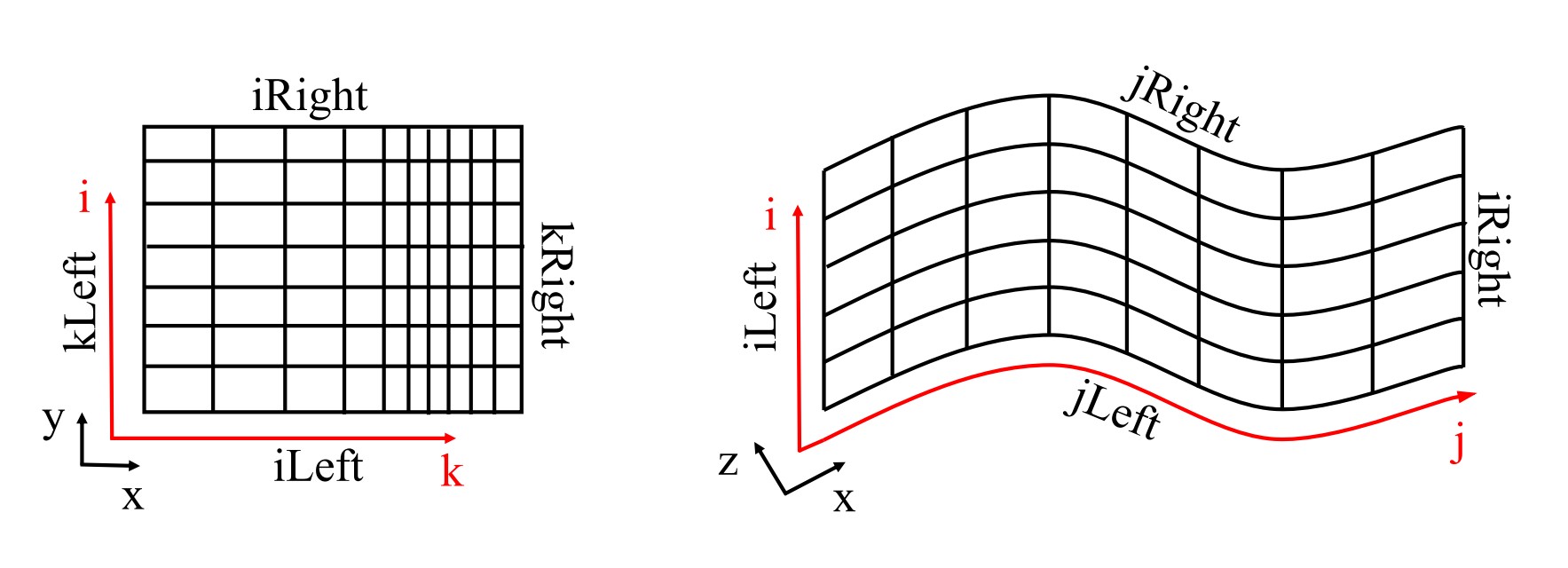
For the end user, it sufficies to know that any mesh provided to TOSCA, either cartesian (through the .xyz format) or curvilinear (through the .grid format), is always internally defined in curvilinear space and so should be the boundary conditions. The transformation between the two spaces is then automatically and internally handled by the code.
When a cartesian mesh is provided through the .xyz format, the user must keep in mind the convention described above to know which boundary is which, but no further action is needed.
Conversely, when the mesh is deformed, a unique relationship between the two set of
coordinates doesn’t exist anymore, and curvilinear coordinates are assigned depending on
how the mesh file has been created. An example cartesian mesh is provided in Sec. Spatial Mesh, both in the .grid and .xyz formats, to
clarify this concept. Notably, the user only needs to know which boundary is which, consequently
being able to apply boundary condition the way he intends to. Not respecting the convention doesn’t have an
impact on the code behavior if ABL is de-activated (-abl flag set to 0 or omitted in the control.dat file).